Unexpected Typewriter: A Practical Guide to Integrating Vintage Grunge into Modern Workflows
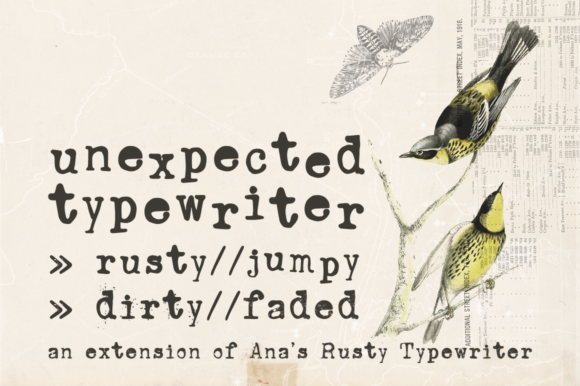
In the landscape of digital design and content creation, typography serves as the bridge between raw information and emotional resonance. While sans-serif fonts dominate the world of user interfaces and corporate branding due to their clean legibility, there is a distinct, growing demand for typography that evokes history, texture, and character. Unexpected Typewriter fills this specific niche. It is not merely a font; it is a hand-drawn serif typeface based on the mechanical imperfections of an old Underwood typewriter. Designed to provide a grungy, vintage aesthetic, this font family—specifically the variations known as Ana’s Rusty Typewriter Jumpy, Dirty, and Faded—offers creators a tool to add tangible grit to digital projects.
Understanding the Asset: The Unexpected Typewriter Family
To effectively implement Unexpected Typewriter into a workflow, one must first understand the specific assets provided in the font family. Unlike standard corporate typefaces that strive for mathematical perfection, this family is defined by its flaws. The hand-drawn nature ensures that the letterforms possess a human touch that digital precision often strips away.
The family consists of three distinct variations, each serving a specific purpose in the design process:
- Ana’s Rusty Typewriter Jumpy: This variation is characterized by a bouncing baseline and irregular spacing, simulating the mechanical jam of a well-used machine. It is ideal for headlines where energy and disorder are required.
- Dirty Typewriter: This version features heavy ink splatters and uneven distribution, mimicking a ribbon that is running out of ink or a machine in need of cleaning. It provides high-contrast texture for dark backgrounds or distressed overlays.
- Faded Typewriter: A subtler option, this variation suggests age and wear. It is best suited for body text in vintage layouts or documents that need to look archival without being illegible.
Technical Preparation and Compatibility
Before integrating Unexpected Typewriter into a production environment, a technical audit is necessary. The most critical feature of this font is the Contextual Alternates OpenType (OT) feature, particularly in the "Jumpy" variation. This feature allows the software to automatically substitute letterforms based on their context, preventing the repetition of the same "imperfect" letter shape side-by-side. This creates a more organic, truly typewritten look.
However, this functionality is not universal across all software. Implementation requires checking your primary tools for OpenType support. For instance:
- Adobe Creative Cloud (Illustrator, InDesign, Photoshop): These applications offer full support. Users must ensure that "Contextual Alternates" is selected in the OpenType panel.
- Procreate and Clip Studio Paint: Support varies by version. Creators should test the font on a dummy canvas before committing to a final layout.
- Standard Office Software (Word, Google Docs): These platforms often have limited support for advanced OpenType features. The "Jumpy" effect may not render, leaving the text static. In these cases, the "Dirty" or "Faded" variations are safer choices for document creation.
Preparation also involves file management. When installing the font, it is best practice to restart the operating system or the specific design software to ensure the font cache updates, preventing rendering errors during the project.
Strategic Implementation in Creative Workflows
The value of Unexpected Typewriter lies in its ability to alter the tone of a project instantly. Integrating it effectively requires thinking about where in the production pipeline it adds the most value.
Pre-Production: Concept and Mood Boarding
During the conceptualization phase, Unexpected Typewriter serves as a visual anchor for themes related to mystery, noir, history, or indie aesthetics. If a client brief mentions "grunge," "vintage," or "authentic," this font should be placed on the mood board immediately. It helps set expectations with stakeholders early on, clarifying that the final product will lean into texture rather than minimalism.
Production: Application in Design
When moving into the design phase, the font interacts with other assets to create a cohesive look. It pairs exceptionally well with sans-serif fonts (like Helvetica or Roboto) for contrast. A common workflow involves using the Jumpy or Dirty variations for large display text (H1 or H2 headers) to grab attention, while using a clean sans-serif for body text to maintain readability.
For creators working on video projects or motion graphics, the "Jumpy" variation can be animated. By placing each letter on a separate layer (a process known as kerning or splitting text), the irregular baseline can be animated to simulate the physical vibration of a typewriter keystroke.
Post-Production: Texture and Final Polish
In the final stages of a design, Unexpected Typewriter can be used as a texture element. By converting the text to outlines or rasterizing it, designers can apply blending modes (such as Multiply or Overlay) to integrate the text into textured paper backgrounds. This is particularly useful for album covers, book jackets, or social media assets aiming for a "zine" aesthetic.
Workflow Integration for Different Professions
Different professionals will find unique utility in this font family based on their daily requirements.
- Marketers and Advertisers: Use the font for "flash sale" graphics or limited-time offers where the urgency and "scrappy" nature of a typewriter message can bypass the polished ad blindness of consumers.
- Educators and Course Creators: When creating worksheets or presentation slides for history or literature, Faded Typewriter adds an academic, archival quality that enhances the learning context.
- Small Business Owners: For brands dealing in coffee, leather goods, or vintage clothing, this font family is essential for packaging design. It communicates "handmade" and "craft" without needing a lengthy explanation.
- Bloggers and Publishers: Use the font for pull quotes or section dividers to break up long-form content and add visual interest to scrolling pages.
Quality Control and Long-Term Use
While the aesthetic appeal of Unexpected Typewriter is high, quality control is vital to ensure the design remains effective rather than chaotic. Because the font is inherently "messy," overuse can lead to visual clutter. A useful rule of thumb is the "5% Rule": limit the usage of high-distress fonts like Dirty to less than 5% of the total canvas area. This ensures it acts as an accent rather than a distraction.
Furthermore, consider the longevity of the design. While grunge trends come and go, the typewriter aesthetic is generally considered a classic motif. However, ensure that the font size is sufficient. At very small sizes (below 12pt), the "dirty" details of the font may blur into illegibility. Always print a test page or view the design at 100% zoom on a mobile device to verify that the message is clear.
Conclusion: Elevating the Mundane
Unexpected Typewriter is more than a novelty; it is a functional tool for adding emotional weight to digital communication. By understanding the technical requirements of the OpenType features and strategically placing the Jumpy, Dirty, and Faded variations within a layout, creators can transform sterile digital text into a tactile experience. Whether used for a full branding overhaul or a single accent piece, this font family bridges the gap between the precision of modern computing and the imperfect charm of analog history.