Whatcha Doing? Exploring the Vibrant World of Full-Color SVG Fonts
In the endless pursuit of making digital text more expressive, designers and creators often find themselves limited by the standard monochrome nature of traditional typography. For years, achieving a rainbow gradient or a textured, hand-painted look within text required complex layering, manual coloring of individual letters, or converting text into rasterized images that lost quality when scaled. If you have ever typed a headline and wished the letters could bleed into one another with the vibrancy of a watercolor painting, you are asking the right questions about the future of typography. Enter Whatcha Doing, a distinctive typeface collection that bridges the gap between static text and dynamic illustration.
Understanding the Whatcha Doing Collection
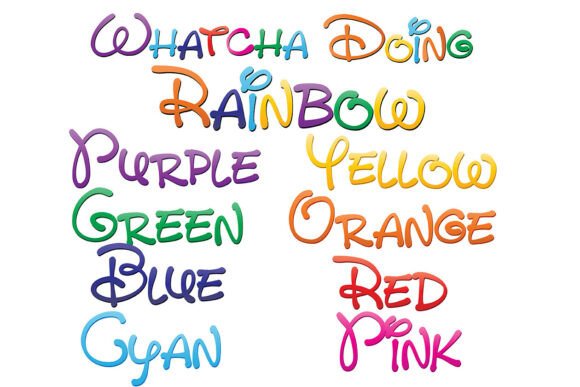
At its core, Whatcha Doing is not just a single font, but a comprehensive system designed for maximum visual impact. The collection features nine full-color fonts that utilize a whimsical, hand-written print style. Unlike standard vector fonts that rely on a single color selected by the user, these fonts come pre-colored with a distinctive gradient featuring eight colors of the rainbow. A ninth font in the collection combines all eight colors, creating a cohesive, multi-hued aesthetic that mimics the look of hand-lettered chalk art or vibrant markers.
The technology behind this is known as OpenType full-color SVG (Scalable Vector Graphics). This format allows font designers to embed rich color data and texture directly into the font file. When you type using Whatcha Doing, you are not just placing a letter; you are stamping a pre-designed, colorful illustration in the shape of that letter. This innovation solves a major pain point for content creators who want high-quality, stylistic text without the technical overhead of graphic manipulation.
Installation and Technical Considerations
One of the most significant advantages of adopting Whatcha Doing is the simplicity of the installation process. Despite the advanced technology powering the color gradients, these files install just like any standard font. For Mac users, this typically involves opening the .otf file in FontBook and clicking "Install." Windows users can achieve the same result through their preferred font manager or the Control Panel.
However, users must navigate a critical technical nuance: software compatibility. While you can install the font anywhere, not all programs can read the color data. If you open Whatcha Doing in a non-compatible program, such as older versions of Microsoft Word, the text will render in solid black. Furthermore, even in programs that do support color fonts, the preview window or font dropdown menu often displays the typeface in black. The true test of compatibility occurs when you type into the actual document canvas. If the program supports full-color SVG, your text will appear in its full rainbow glory.
Currently, a robust list of industry-standard applications supports this technology. If you are using Adobe products (like Photoshop, Illustrator, or InDesign), Silhouette Studio, Quark, or Inkscape, you can utilize Whatcha Doing immediately. This compatibility list is growing, but for now, it is essential to verify your software environment to ensure you get the full experience.
Practical Applications and Design Outcomes
The primary goal of using a typeface like Whatcha Doing is to inject personality and energy into a project. Because the font is vector-based, it retains its crisp, clean edges regardless of size, making it incredibly versatile for various outputs.
Branding and Logo Design
For businesses targeting a younger demographic or those in the creative industries, Whatcha Doing offers an immediate way to establish a playful brand identity. A coffee shop, a daycare center, or a boutique party planner could use this font for their logo to convey approachability and fun. Because the font handles the coloring, the designer ensures consistency across all brand materials without worrying about matching specific hex codes for gradients.
Crafting and Silhouette Projects
In the crafting community, particularly among users of Silhouette Studio, the demand for "print and cut" or heat transfer vinyl (HTV) designs is high. While HTV usually requires single-color layers, Whatcha Doing shines in print-based projects. Imagine creating custom greeting cards, scrapbook titles, or planner stickers. The whimsical, hand-written style combined with the rainbow gradient creates a "ready-to-go" aesthetic that saves hours of manual design work.
Digital Media and Social Content
Social media managers constantly seek ways to stop the scroll. Text-heavy graphics often get ignored, but the visual distinctiveness of Whatcha Doing can draw the eye. It is particularly effective for Instagram Stories, YouTube thumbnails, or blog headers where a touch of whimsy is required. The font acts as both a communication tool and a graphic element, reducing the need for additional clip art.
Different Approaches for Different Users
Not every designer will use Whatcha Doing in the same way. The versatility of the collection allows for different creative workflows depending on the user's end goal.
- The "Plug and Play" User: This user needs a quick solution for a party invitation or a school newsletter. They will likely use the font in a compatible program like Adobe Illustrator or Inkscape, type their message, and export. The pre-set rainbow gradient requires no tweaking, offering a professional look with zero effort.
- The Advanced Designer: This user may want to alter the font's appearance. Because Whatcha Doing is a vector-based SVG font, an advanced user can expand the appearance of the text in a program like Illustrator. This converts the text into vector shapes, allowing the designer to isolate specific letters, change the direction of the gradient, or mix and match the eight available colors to create custom palettes.
- The Problem Solver: Sometimes, a design feels "flat." A user might be working on a poster that looks too corporate or sterile. By swapping a standard header font for Whatcha Doing, they can instantly soften the tone of the piece, making it feel more hand-crafted and organic without sacrificing the scalability of vector graphics.
Overcoming Common Typography Challenges
Many designers struggle with the "uncanny valley" of text effects—where applying a gradient or texture to standard text looks fake or dated. Whatcha Doing addresses this by offering a hand-written print style that naturally complements the color shifts. The whimsical nature of the strokes absorbs the gradient in a way that feels organic, rather than digitally forced.
Furthermore, the inclusion of the ninth font—which combines all eight colors—solves the issue of cohesion. It allows a designer to use one letter in red, the next in blue, and the following in green, all while maintaining a unified artistic vision. This eliminates the guesswork involved in choosing complementary colors and ensures that the typography remains legible and balanced.
Conclusion
Typography is the voice of design, and with Whatcha Doing, that voice is louder, brighter, and more expressive than ever before. By leveraging the power of OpenType full-color SVG technology, this collection removes the barriers between text and illustration. Whether you are a professional graphic designer looking to streamline your workflow, a crafter seeking vibrant elements for your next project, or a business owner aiming to brighten your branding, Whatcha Doing provides a practical, high-quality solution. It transforms the mundane act of typing into a creative opportunity, ensuring that your text is never just read—it is experienced.