Integrating Minimalist Sans into Your Visual Workflow
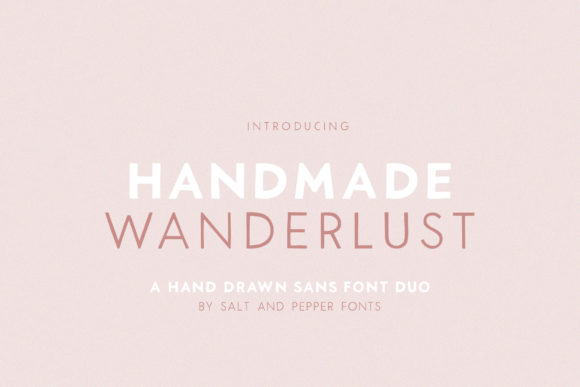
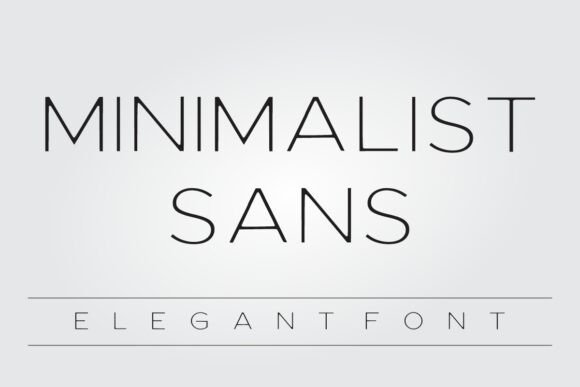
In the lifecycle of any creative project, typography is often treated as a final decorative layer—a decision made in the last mile of design. However, for professionals, creators, and entrepreneurs who value efficiency and clarity, font selection should be an operational decision made early in the planning phase. Minimalist Sans, a thin, simple, and elegant display font, offers a specific solution for projects requiring a relaxed yet professional touch. Understanding how to integrate this asset into your workflow can streamline your design process and enhance the final output, whether you are working on product packaging, digital content, or brand identity.
The Strategic Role of Typography in Planning
Before opening a design tool or briefing a designer, successful project execution requires defining the emotional and functional tone of the deliverable. This is where Minimalist Sans fits into the preparation stage. Its characteristics—an informal style and a casual vibe—make it a specific tool rather than a generalist workhorse. If your project goal is to convey approachability, modernity, or a "breath of fresh air," selecting this font at the mood-boarding stage saves significant time during execution.
Consider the decision-making process for a small business owner launching a new product line. The choice of font dictates the texture of the visual narrative. By identifying Minimalist Sans early, you align your copywriting and visual assets with the font's inherent geometry. You are not just picking a style; you are setting a constraint that guides subsequent creative decisions, ensuring that your imagery, color palette, and layout remain consistent with the font's relaxed aesthetic.
Practical Implementation in Product Packaging
Product packaging is a high-stakes environment where legibility and aesthetic appeal must coexist. When integrating Minimalist Sans into a packaging workflow, the font serves best as the primary carrier for the product name or key slogans. Its thin, elegant structure allows it to stand out against textured backgrounds or complex product photography without overwhelming the visual field.
For a freelancer or agency working on a label design, the workflow typically involves establishing a hierarchy of information. Minimalist Sans excels in the "headline" or "accent" tier of this hierarchy. For example, on a cosmetic bottle or a food label, using this font for the flavor name or the brand tagline creates an immediate association with cleanliness and simplicity. To implement this effectively, ensure there is sufficient contrast between the font weight and the background. Because the font is thin, it requires a clean background or a bold color contrast to maintain accessibility standards, particularly for older demographics or those with visual impairments.
Digital Assets and Invitation Design
For event planners, educators, and marketers, the creation of digital assets such as invitations, announcements, and social media quotes is a recurring task. The efficiency of this process relies on templates and consistent font usage. Minimalist Sans is particularly effective for digital formats because its simplicity renders well on various screen resolutions and devices.
When designing a wedding invitation or a corporate event flyer, the "casual vibe" of Minimalist Sans bridges the gap between formal etiquette and modern communication. In a workflow context, this means you can use the same typeface for both the formal event details (time, date, location) and the informal call-to-action (RSVP, website link). This reduces the cognitive load of managing multiple font families. A practical tip for implementation here is to pair Minimalist Sans with a clean serif font for body text if the invitation contains dense information. This creates a visual rhythm that guides the reader’s eye naturally from the relaxed headline to the informational details.
Branding and Logo Development
Developing a logo is often a complex process involving multiple stakeholders and iterations. Minimalist Sans can serve as a foundational element for brands that wish to project a contemporary, approachable identity. For entrepreneurs and startups, the font's versatility allows it to be used across various touchpoints—from the website header to the email signature—without requiring extensive modification.
In a logo design workflow, the font acts as the anchor. When using Minimalist Sans, the design process shifts from "decoration" to "refinement." Because the font is inherently simple, the focus moves to spacing (kerning) and alignment. A useful observation for designers is to pay close attention to the letter spacing. Thin fonts often benefit from slightly increased tracking to ensure they do not appear cramped or fragile. By adjusting the spacing early in the vectorization process, you ensure that the logo remains legible when scaled down for a favicon or scaled up for signage.
Integration with Digital Tools and Platforms
No font exists in a vacuum. Its utility is defined by how well it interacts with your existing software stack. Minimalist Sans is compatible with standard design and productivity software, including Adobe Creative Suite, Canva, and web builders like Squarespace or Wix. For the productivity-minded user, the goal is to minimize friction.
A practical workflow tip is to install Minimalist Sans as a system-level font and create a specific "Brand Kit" or template within your preferred platform. For instance, if you are a blogger creating weekly quote graphics, setting Minimalist Sans as the default header font in your Canva template eliminates the need to search for and select the font for every new post. This small automation step accumulates over time, resulting in significant efficiency gains. Furthermore, ensure that the font file you are using is web-optimized (WOFF2 format) if you intend to use it on a website, as this impacts page load speed and SEO performance.
Quality Control and Consistency
As projects scale, maintaining visual consistency becomes a challenge. Whether you are a publisher managing a series of book covers or a marketer running a multi-channel campaign, Minimalist Sans can serve as the "glue" that holds the visual identity together.
During the quality control phase of your workflow, review all assets to ensure the font is being applied consistently. Check for uniformity in size, color, and placement. Because Minimalist Sans has a distinct casual elegance, mixing it with overly ornate or heavy fonts can dilute its impact. A useful rule of thumb is to limit the design to two typefaces: Minimalist Sans for display purposes and a highly readable sans-serif (like Roboto or Open Sans) for body copy. This constraint forces a disciplined approach to design that results in cleaner, more professional outcomes.
Long-Term Application and Adaptability
The true value of a font lies in its longevity and adaptability across different contexts. Minimalist Sans is not limited to one specific industry; its utility spans from t-shirt design to corporate presentations. For the educator creating lecture slides, the font provides a clean, uncluttered look that aids in information retention. For the hobbyist designing merchandise, it offers a stylish, retail-ready aesthetic.
When planning for long-term use, consider how Minimalist Sans will age with your brand. Its thin, modern lines suggest a forward-thinking mindset, making it suitable for tech startups, wellness brands, and creative agencies. By documenting its usage rules in a style guide—specifying when and how to use Minimalist Sans—you create a reusable asset that streamlines future projects. This preparation ensures that whether you are working on a quick social media post or a comprehensive annual report, the execution remains efficient and the brand voice remains distinct.