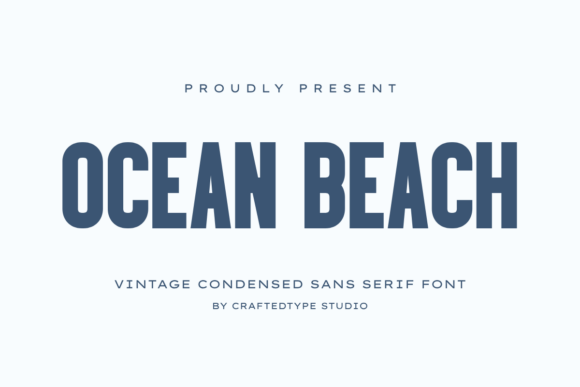
Ocean Beach: Your Guide to Mastering This Stylish Vintage Font
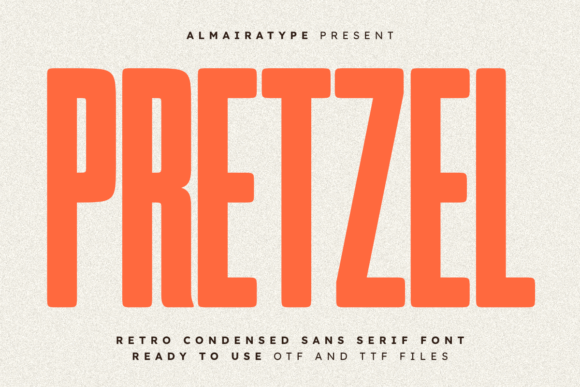
Finding the perfect typeface can often feel like searching for a needle in a haystack, especially when you need something that bridges the gap between professional utility and artistic flair. Enter Ocean Beach, a sleek and stylish vintage condensed sans serif font designed specifically for creators who value clean aesthetics and strong visual impact. With its tall, narrow letterforms and timeless retro charm, this font is not just another download; it is a tool designed to elevate the quality of your visual communication.
Whether you are a small business owner crafting a new brand identity, a freelancer working on Print On Demand (POD) projects, or a hobbyist looking to improve your graphic design skills, understanding how to leverage a font like Ocean Beach is crucial. It is perfectly suited for t-shirts, posters, mugs, and tote bags, but its versatility extends far beyond merchandise. It shines in modern packaging, logo design, and minimalist editorial layouts. However, even the best tools can fail if used incorrectly. To get the most out of this vintage condensed sans serif, you need to avoid common pitfalls that plague many design projects.
Understanding the Power of Condensed Typography
Before diving into the application, it is helpful to understand the DNA of Ocean Beach. As a condensed font, it occupies less horizontal space than standard fonts, allowing you to fit more text into tighter areas without sacrificing readability. This characteristic makes it ideal for headlines, banners, and packaging where space is at a premium. The "vintage" aspect refers to its stylistic nod to mid-century design—think classic surf culture, retro signage, and clean industrial aesthetics.
One of the most frequent misunderstandings regarding fonts like Ocean Beach is the assumption that "condensed" means "small." This leads to a critical error: setting the font size too low. Because the letterforms are tall and narrow, setting them at a small size can make them look cramped and difficult to read, particularly on digital screens or low-resolution prints.
Avoiding the Legibility Trap
The most common mistake beginners and even some professionals make is prioritizing aesthetics over usability. You might love the look of a dense block of text in Ocean Beach, but if your audience has to squint to read it, your message is lost.
The Mistake: Using Ocean Beach for long paragraphs of body text or setting the font size too small to create a "minimalist" look that ends up being illegible.
The Consequence: Poor user experience, high bounce rates on websites, or rejected print files. In the POD space, a customer won't buy a t-shirt if they can't read the slogan from a normal distance.
The Solution: Treat Ocean Beach as a display or headline font. It is engineered to make a statement. Use it for titles, subheadings, and call-to-action buttons where it can be sized larger to show off its unique style. For body text, pair it with a clean, standard-width sans serif or a readable serif font. This contrast creates a visual hierarchy that guides the reader's eye naturally.
Mastering PUA Encoding and Software Compatibility
Ocean Beach comes in OTF and TTF formats and is fully PUA (Private Use Areas) encoded. This technical detail is a massive advantage, but it is also a source of confusion for many users. PUA encoding means that all the unique characters, glyphs, and stylistic alternates are accessible even if you don't have professional design software like Adobe Illustrator or Photoshop.
However, a frequent error occurs when users download the font but fail to utilize these features because they don't know how to access them, or they use software that doesn't support advanced OpenType features.
The Mistake: Buying Ocean Beach for its unique stylistic alternates but only typing with the standard letters because the user is working in basic software (like Microsoft Word or Canva) and doesn't know how to access the character map.
The Consequence: You end up with a generic-looking design that doesn't utilize the full potential of the font, leading to dissatisfaction and a wasted investment.
The Solution: If you are using standard software, utilize a character map tool (available on both Windows and Mac) to copy and paste the special glyphs included in the PUA encoding. If you are using professional software like Adobe Illustrator, explore the "OpenType" panel to access ligatures and alternates. Before purchasing, always check if your primary design tool supports advanced font features to ensure you can actually use what you are buying.
Context is King: Matching Font to Project
While Ocean Beach is versatile, it is not a "one-size-fits-all" solution. Its strong vintage personality means it can clash with certain design themes if not applied thoughtfully. A common oversight is forcing a retro font into a context that demands a completely different tone, such as corporate finance or medical technology.
The Mistake: Using Ocean Beach for a project that requires a strictly modern, clinical, or formal tone, simply because the designer likes the font.
The Consequence: The design feels disjointed. The font sends a signal of leisure, summer, and nostalgia, which can undermine the seriousness or modernity of a brand that doesn't align with those values.
The Solution: Evaluate the emotional resonance of the font. Ocean Beach excels in summer-themed projects, coastal branding, food and beverage packaging, and lifestyle blogs. If you are designing for a tech startup or a law firm, this font is likely the wrong choice. However, if you are creating a logo for a beach bar, a poster for a music festival, or branding for a clothing line, Ocean Beach is an excellent fit.
Practical Advice for Print On Demand Success
For creators in the Print On Demand market, the stakes are slightly different. Here, the design isn't just a layout; it's a product. The quality of the font file directly impacts the quality of the merchandise.
Check File Formats: Always ensure you are using the correct format for your workflow. OTF (OpenType Font) generally offers more features and is preferred for modern design software, while TTF (TrueType Font) is widely compatible with older systems. Ocean Beach provides both, which is a sign of a high-quality font package.
Spacing and Kerning: Vintage condensed fonts often require manual kerning (adjusting the space between specific pairs of letters). Do not rely solely on the auto-kerning in your software. Letters like "T" followed by "o" or "A" followed by "V" often need to be pulled closer together to create a polished, professional look. Failing to kern your text is a subtle mistake that makes designs look amateurish.
Final Checklist Before You Design
Before you finalize your project using Ocean Beach, run through this quick checklist to ensure quality:
- Readability Check: Can you read the text easily from a reasonable distance? If it's for a mug, imagine holding it at arm's length.
- Color Contrast: Does the font color stand out against the background? Condensed fonts have less surface area, so they sometimes need slightly higher contrast than wider fonts.
- Contextual Fit: Does the vintage style support the message? If the answer is yes, you are likely on the right track.
- Technical Access: Have you explored the special characters? A small flourish or ligature can turn a good design into a great one.
By understanding the strengths of Ocean Beach