Little Love: Integrating Refined Script Typography into Your Professional Workflow
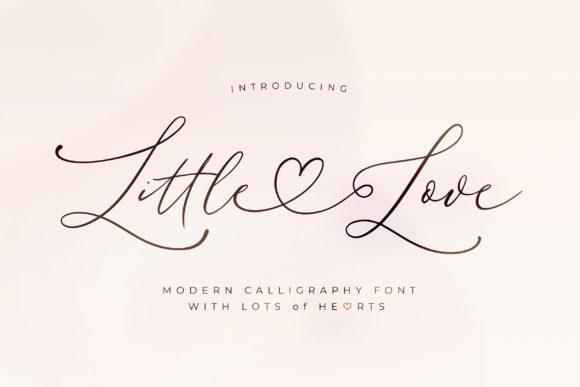
In the fast-paced environment of modern digital creation, the choice of typography is rarely just an aesthetic decision; it is a functional one. Whether you are a graphic designer compiling a brand identity, a small business owner drafting marketing collateral, or a blogger curating visual content, the font you select dictates the efficiency of your workflow and the quality of your final output. While bold sans-serifs often dominate the UI landscape, there remains a critical need for fonts that convey elegance, personality, and warmth. This is where Little Love enters the creative process. As a refined and graceful script font, it serves as a specific tool designed to bridge the gap between technical precision and emotional resonance.
Understanding the Technical Foundation
Before integrating any asset into a professional toolkit, it is necessary to evaluate its technical architecture. Little Love is characterized by a clean, thin, and smooth aesthetic. However, its utility goes beyond surface-level beauty. The defining feature of this typeface is its PUA (Private Use Areas) encoding. For the uninitiated, PUA encoding is a Unicode standard that allows font designers to place special characters in a space that standard keyboards do not access.
In practical terms, this means that using Little Love does not require advanced knowledge of complex keystrokes or OpenType features within software like Adobe Illustrator or InDesign. Instead, you can access the full library of glyphs and swashes through a standard character map. This technical feature significantly reduces the friction in the design process, allowing you to implement flourishes and stylistic alternates immediately, rather than spending time troubleshooting font compatibility.
Where Little Love Fits in the Design Process
Every design project follows a lifecycle: planning, drafting, execution, and review. Little Love is not a font for body text or user interface navigation; rather, it is a specialized asset for the execution phase of high-impact visual elements. Its role is to provide a "hero" element that draws the eye.
Early Planning and Asset Selection
During the planning phase, when you are defining the mood board for a project, Little Love fits into the category of "Romantic," "Elegant," or "Sophisticated" typography. If the project goal is to convey luxury, intimacy, or organic craftsmanship, this font should be shortlisted early. By identifying the need for a script font at the start, you can ensure that your layout software has the necessary spacing and hierarchy to accommodate its fluid strokes.
Drafting and Composition
When moving from wireframes to visual drafts, the thin, smooth vibe of Little Love allows it to layer well over photography without obscuring the image. Unlike heavy blackletter or blocky display fonts, its weight is delicate. This makes it an ideal candidate for overlaying on hero images, creating a "see-through" effect that adds depth to the composition. It interacts harmoniously with light backgrounds and high-contrast photography, serving as a textural overlay rather than a solid block of color.
Practical Implementation and Workflow Integration
Integrating a new font into an existing workflow requires a strategy for implementation to ensure consistency and efficiency. Here is how to practically apply Little Love across various professional scenarios.
Utilizing Glyphs and Swashes
The primary value proposition of Little Love is the ease of accessing its alternate characters. In a typical workflow, a designer might type a word and find the capital letter looks disconnected from the lowercase letters. With PUA encoding, the process is streamlined:
- Selection: Type your text using the standard Little Love keystrokes.
- Isolation: Highlight the specific letter you wish to alter, typically the first or last letter of a word.
- Substitution: Open your operating system’s Character Map (Windows) or Font Book (Mac), locate the Little Love glyph set, and copy the swashed version of that letter.
- Replacement: Paste the glyph over the standard character in your design software.
This process allows for the creation of custom wordmarks that look hand-lettered without the time investment of actual calligraphy. It is a workflow optimization that yields high-quality, bespoke results.
Pairing with Complementary Assets
A script font rarely works in isolation. To maintain readability and visual hierarchy, Little Love must be paired with a contrasting typeface. Because Little Love has a clean and thin profile, it pairs best with a geometric sans-serif or a light-weight serif font.
For example, in a wedding invitation workflow, you might use Little Love for the couple's names (the focal point) and a clean sans-serif like Montserrat or Lato for the event details (the information layer). This contrast ensures that the "Little Love" script commands attention while the supporting text remains legible and organized. Avoid pairing it with other ornate scripts, as this creates visual clutter and compromises the "graceful" aesthetic.
For the Entrepreneur and Small Business Owner
Brand identity relies heavily on visual cues. If you are a small business owner in the lifestyle, beauty, or artisanal sector, Little Love can serve as the logotype for your brand. The workflow involves creating the logo once, converting the text to outlines (to prevent font compatibility issues on different computers), and saving it as a vector file (.SVG or .EPS). Once outlined, this asset becomes a permanent, scalable part of your brand kit, ready for use on business cards, packaging, and social media headers.
For Bloggers and Content Creators
Content creators often need to produce graphics quickly. When creating Pinterest pins or Instagram quotes, the goal is to stop the scroll. Little Love is effective here for pull-quotes or emphasis text. A practical workflow tip is to create a template in a tool like Canva or Photoshop. Pre-load the Little Love font and set up a text box with the desired swashes already applied. Save this as a template file. For future content, you simply open the template, change the words, and export. This standardizes your aesthetic and speeds up your content production pipeline.
For Educators and Publishers
In the realm of educational materials or digital publishing, Little Love can be used to demarcate headers or chapter titles in digital workbooks. Its smooth vibe softens the reading experience, making dense educational content feel more approachable. However, it should be reserved strictly for display purposes. Do not use Little Love for instructional text or captions, as the script style can slow down reading speed for dense information.
Quality Control and Compatibility
When implementing Little Love, quality control is essential to maintaining a professional standard.
- Kerning Check: Script fonts often require manual kerning. After typing your text, visually inspect the spacing between letters. Ensure that the swashes do not collide awkwardly with adjacent letters. If a collision occurs, adjust the tracking or manually move the letter using your design software's kerning tools.
- Resolution: Because Little Love features thin strokes, it requires high resolution to be legible. On low-resolution screens or small print sizes, thin lines can disappear or look "broken." Always ensure your canvas size is large enough to support the font's delicacy.
- Color Contrast: The "thin" nature of the font means it has low surface area. To ensure accessibility and readability, use high-contrast colors. A dark grey Little Love on a white background works well, but a light grey on a white background will be illegible.
Long-Term Asset Management
Finally, consider how Little Love fits into your long-term digital asset management. Fonts are intellectual property, and managing your license is part of the professional workflow. Ensure that you store your font files (both .OTF and .TTF versions) in a dedicated, backed-up folder on your cloud drive. Label them clearly. If you work with a team, ensure everyone has the font installed to prevent "missing font" errors when opening shared project files.
By treating Little Love not just as a decorative element but as a structured component of your creative toolkit, you leverage its full potential. Its combination of aesthetic refinement and technical accessibility (via PUA encoding) makes it a reliable asset for adding a touch of sophistication to any project, provided it is integrated with care, purpose, and an understanding of its strengths.